With the quarter-hour totals of your digital meter, our payback calculator works out exactly what a home battery earns you: every quarter hour of the year, with your real monthly peaks. Here is how to download them in a few minutes. Mijn Fluvius is in Dutch; we give the exact terms.
Step 1: open your consumption
Log in at mijn.fluvius.be and choose your digital electricity meter. Open the Verbruik tab, choose the Dag or Week view with the small clock at the top (1) and click Historiek downloaden on the right (2).

Step 2: choose Kwartiertotalen
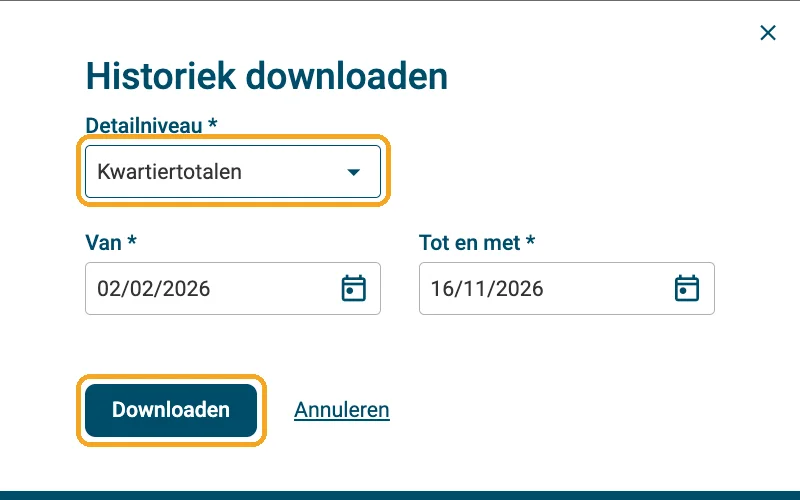
Under Detailniveau, Dagtotalen is selected by default. Choose Kwartiertotalen (quarter-hour totals). Daily and monthly totals contain no peaks and no daily profile: the calculator can then only estimate.
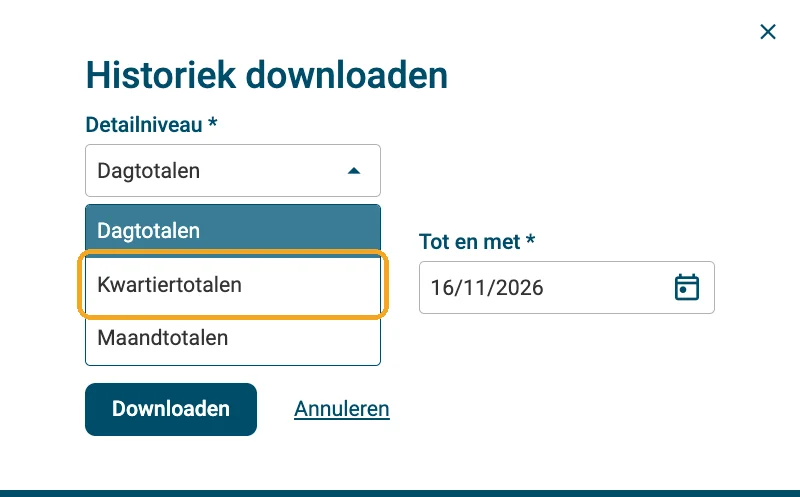
Step 3: choose the period and download
Under Van and Tot en met, preferably choose the last 12 months, so that summer and winter are included. If your meter is less than a year old, take as long a period as possible. Click Downloaden: you get a CSV file in your Downloads folder.
Step 4: load the file into the calculator
Open the calculator, choose the Exact tab and click Choose CSV file. Import, export and monthly peaks are filled in automatically, and you see your consumption per month. The file stays in your browser: nothing is sent.
Would you rather have us look at it? Send the file via WhatsApp or to info [at] ht-elektriciteit.be.